

By: Andrew Jackson
Omnichannel e-commerce companies sell through many channels. These may include online stores, marketplaces, retail locations, mobile apps, and wholesale portals.
Managing orders across all these channels can be difficult. Inventory, payments, shipping, and customer data must stay accurate and connected.
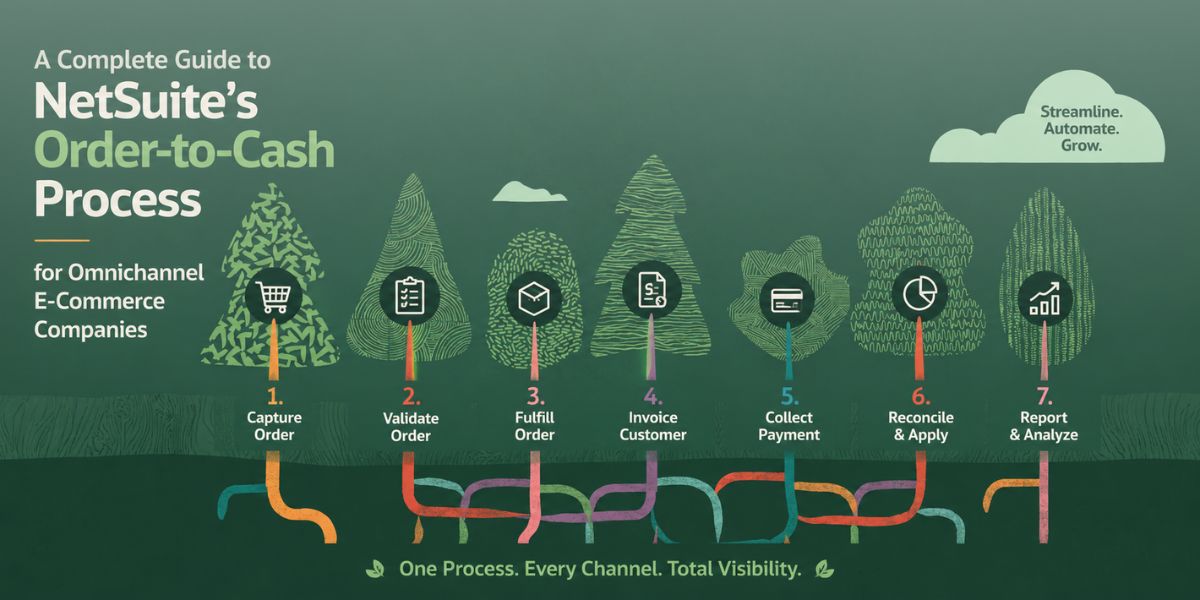
NetSuite’s order-to-cash (O2C) process helps bring these activities together. It covers every step from receiving an order to collecting and recording payment.
For growing e-commerce companies, a strong O2C process can reduce manual work, improve accuracy, and give teams better visibility.
What Is the Order-to-Cash Process?
Order-to-cash includes all the steps needed to turn a customer order into revenue.
In NetSuite, these steps can take place within one connected system. Sales, warehouse, finance, and customer service teams can work from the same data.
A typical O2C process includes:
- Receiving the customer order
- Checking inventory
- Approving the order
- Picking and packing products
- Shipping the order
- Creating an invoice
- Collecting payment
- Recording the payment
- Updating financial records
For omnichannel companies, NetSuite can also bring orders from different sales channels into one system.
1. Capture Orders from Every Sales Channel
The process begins when a customer places an order.
Orders may come from:
- Your e-commerce website
- Amazon or other marketplaces
- Retail stores
- Mobile apps
- Wholesale portals
- Social commerce channels
Each order needs the correct customer, product, pricing, tax, shipping, and payment information.
Integrations can connect these sales channels with NetSuite. This reduces manual data entry and helps prevent errors.
Once orders enter NetSuite, teams can manage them from one central location.
2. Check Inventory Availability
NetSuite can check inventory after an order is received.
This is important for businesses that keep products in several locations, such as warehouses, retail stores, distribution centers, or third-party logistics providers.
Accurate inventory data helps prevent overselling. It also makes it easier to decide where an order should be fulfilled.
For example, a company may ship an order from the location closest to the customer. This can reduce shipping costs and improve delivery times.
3. Approve and Process Orders
Some orders may need approval before they move to fulfillment.
NetSuite workflows can automate many of these approvals.
Rules may be based on:
- Order value
- Customer credit limits
- Discounts
- Payment terms
- Products
- Sales channels
Automation helps orders move faster while making sure company rules are followed.
It also reduces the amount of time employees spend reviewing routine orders.
4. Pick, Pack, and Ship Products
Once the order is approved, fulfillment begins.
Warehouse teams can use NetSuite to see which products need to be picked, packed, and shipped.
Order status can also be updated as products move through the warehouse.
This gives other teams more visibility. Customer service employees, for example, can quickly check whether an order has shipped.
Tracking details can also be sent back to the e-commerce platform or marketplace so customers receive shipping updates.
5. Create the Invoice
The next step is billing.
How this works depends on the type of order.
For many direct-to-consumer orders, customers pay during checkout. For wholesale or B2B orders, customers may receive an invoice with payment terms such as Net 30.
NetSuite can support both models.
This is useful for omnichannel companies that sell directly to consumers while also working with wholesale customers.
6. Collect and Record Payments
Customers may use several payment methods, including:
- Credit cards
- Debit cards
- Digital wallets
- Bank transfers
- Marketplace payments
- B2B payment terms
NetSuite can record these payments and connect them with the correct transactions.
Integrating payment platforms with NetSuite can automate much of this work. Finance teams spend less time matching payments by hand and can more easily see unpaid balances.
7. Reconcile Payments and Financial Records
Receiving payment is not the final step.
Finance teams still need to match deposits, fees, refunds, and payments with the correct transactions.
This can be difficult for omnichannel businesses.
For example, a marketplace may send one deposit that covers hundreds of orders. It may also subtract commissions, shipping charges, and other fees.
NetSuite can help organize these transactions and make reconciliation easier.
Accurate records also improve reporting for:
- Revenue
- Accounts receivable
- Cash flow
- Refunds
- Sales by channel
- Order profitability
Common Order-to-Cash Challenges
NetSuite can automate many O2C tasks, but the system must be set up correctly.
Common problems include:
- Poor sales channel integrations
- Duplicate orders or customer records
- Incorrect inventory levels
- Manual payment reconciliation
- Inconsistent product data
- Complex marketplace fees
- Too many manual approval steps
Regularly reviewing these areas can help businesses find delays and remove unnecessary work.
How to Improve Your NetSuite O2C Process
Start by reviewing the full journey from order creation to payment.
Look for manual steps, repeated data entry, and areas where teams often fix errors.
NetSuite workflows, integrations, and automation can often simplify these tasks.
Working with an experienced NetSuite partner can also help. A partner can review your current setup, find gaps, and suggest improvements to integrations, workflows, reporting, and automation.
Final Thoughts
A strong NetSuite order-to-cash process connects sales, inventory, fulfillment, billing, payments, and accounting.
For omnichannel e-commerce companies, this creates one clear view of the entire customer order journey.
When the process is set up well, businesses can reduce errors, process orders faster, improve cash flow visibility, and spend less time on manual work.
As your company adds more sales channels and order volume grows, an efficient O2C process can make that growth much easier to manage.